Back to BalanGo

Services

Find a helping hand.
Share your expertise.

Discover services, understand what is offered and check a provider’s available schedule. If you have a skill to share, create a service listing and make it easier to find.

Get BalanGo ↗

Available for iPhone and Android

Discover service providers, explore service details and check available schedules with BalanGo. Offer your own skills in the iPhone and Android app.

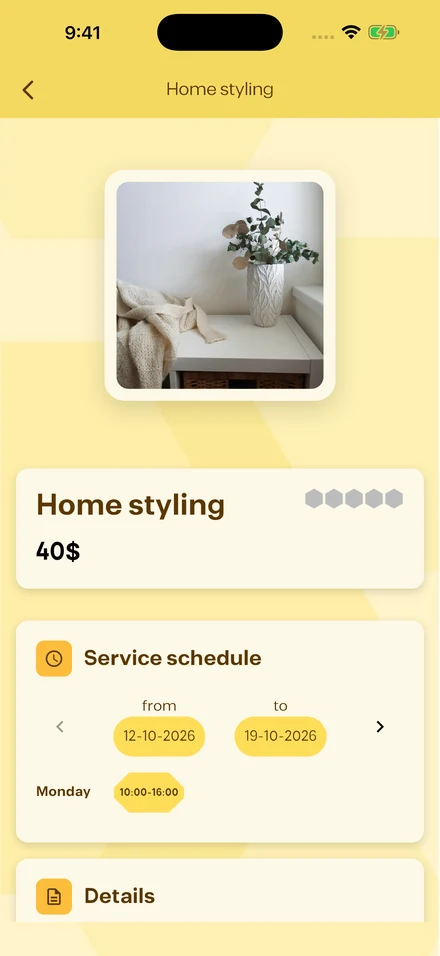
Actual app screens. Illustrative sample content.

01

Understand what is offered

Service listings help you explore providers and understand the work they offer. Open a service to see its description and the information supplied by the provider. A useful starting point is a clear description of your own needs.

02

Check the schedule

A service page can show the provider’s available schedule. Review the displayed dates and time ranges before taking the next step. Use the service’s conversation action to discuss the request and agree on the details with the provider.

03

Make your skills easier to discover

Create a service listing with useful photos and an accurate description. Keep your availability up to date and use in-app conversations to clarify requests. BalanGo gives independent professionals a place to present what they do alongside other community opportunities.

A FEW GOOD QUESTIONS

Before you get started.

Contact ↗
What can I do with BalanGo?

Browse products, find services, explore job opportunities and discover events. You can also create a shop, list a service, post a job or organize an event.

Is BalanGo available on my phone?

BalanGo is available on the Apple App Store for iPhone and on Google Play for Android. Check the store listing for your device’s current compatibility.

Can I use the app in Arabic?

Yes. BalanGo supports English and Arabic. The Arabic app experience uses a right-to-left layout.

Do I need an account?

You can explore the marketplace before signing in. Create an account to contact people, place requests or manage your own listings and activity.

How do I get help?

Contact the BalanGo team through our contact page or email the support address listed there.

YOUR NEXT DISCOVERY STARTS HERE

A place for what you need.
And what you have to offer.

Get BalanGo on your phone and explore your next product, service, job or event.

Available for iPhone and Android

Scan with your phone

BalanGoGet BalanGo